RRSP and FHSA contributions can reduce taxable income, but knowing that is not the same as knowing what to do. The amount depends on income, tax already withheld, EI and other income, province-specific rules, and available contribution room.
Room to Save turns those variables into a goal-based plan. It recommends a starting amount, explains the trade-offs, and lets people compare alternatives instead of guessing and recalculating.
Problem, strategy, desk research, information architecture, UX/UI, calculation requirements, test design, and release.
Calculators tell you what a contribution would save. None of them tell you how much to contribute — which is the decision people are actually stuck on.
Owned strategy, research, IA, UX/UI, calculation requirements, and test design; shipped a deployed bilingual MVP covering three provinces and two tax years.
A live product that recommends a contribution for the user's chosen tax goal, with 37 scenarios reconciled against TurboTax and Wealthsimple to the cent.
A tax surprise — followed by two conflicting answers
After filing my 2024 return, I learned that I owed about CAD $1,000. I wanted to avoid the same surprise the following year, so I asked two bank advisors whether an RRSP contribution would help.
Make a large contribution.
Because of about three months of EI, probably do not contribute at all.
I chose not to contribute that year. When I filed, I owed nothing and received a small refund.
What bothered me was not simply that the answers were different. I had no straightforward way to check either one against my own numbers. There is no shortage of material explaining RRSPs, EI, deductions, and tax brackets — and none of it told me what to do.
That became the premise for Room to Save: start with the outcome a person wants, then work backwards to a reasonable contribution.
The same question kept appearing: how much should I contribute?
I looked through Canadian personal-finance discussions, CRA guidance, and existing tax and RRSP calculators. This was desk research, not a formal interview study, so I used it to spot recurring questions and wording rather than to make broad claims about all Canadians.
Across the discussions, people rarely asked for more tax theory. They wanted to know how much to contribute to avoid owing, lower taxable income, cross a bracket threshold, or create a refund without tying up more cash than necessary.
“Is there a calculator that could tell me how much I need to contribute to have 0 owing.”
“I think this thing may be broken? When I run it, it recommends to contribute 55k. lol.”
CRA guidance confirmed the building blocks: eligible RRSP contributions can reduce tax, FHSA contributions are generally deductible, and EI is taxable. But those facts still have to be combined with income, deductions, tax already withheld, provincial rules, and available room before they become a useful recommendation. Existing tools stop at the same place.
Where the existing tools stop
Four things I took from the research
- People describe the outcome they want, not the formula behind it. They ask how to avoid owing, how much a refund might change, or what it would take to cross a bracket threshold.
- Contribution room is a limit, not a recommendation. Someone may be allowed to contribute far more than they need — or can comfortably afford — for the goal in front of them.
- The answer depends on the full tax picture. Salary alone is not enough; tax withheld, EI and other income, province, CPP/QPP details, and deductions can all change the result.
- A recommendation needs to be inspectable. When calculators disagree or return a surprisingly large number, users need to see what drove it and what would happen if they chose differently.
Reverse the calculator: start with the goal
Who this is for
Room to Save is not built around a profession or an income bracket. It is built around a moment: the weeks before the RRSP deadline, when someone knows they have room available and has no reliable way to decide how much of it to use. In practice that includes salaried employees with a single T4, first-time home buyers weighing FHSA against RRSP, and people whose year was irregular because of EI, self-employment, or investment income.
Help Canadians determine a reasonable RRSP and FHSA contribution for a specific tax goal, without requiring them to understand or manually model the tax system?
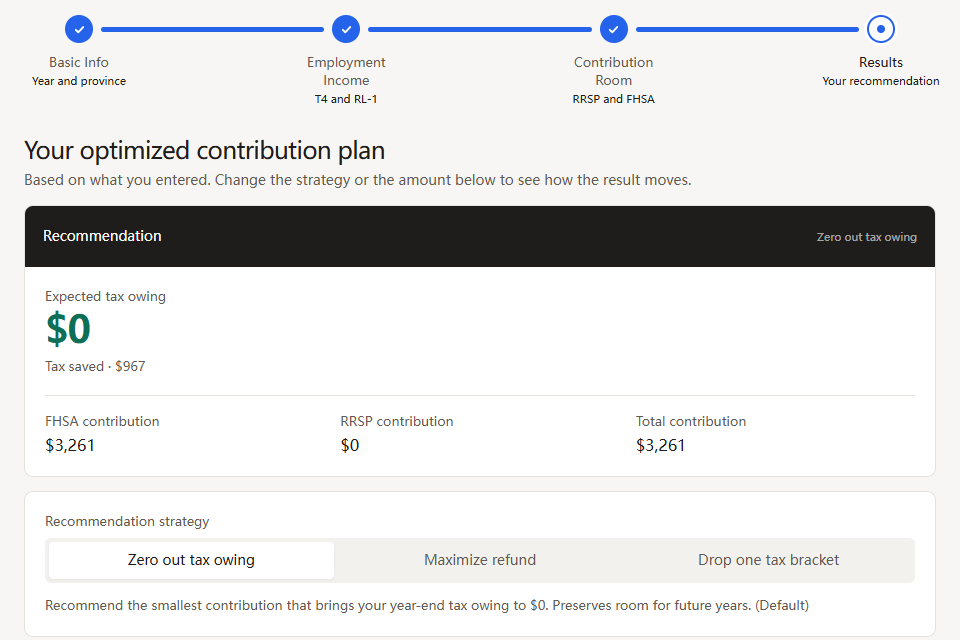
Most calculators start with a contribution and show the tax result. Room to Save runs the question in reverse: given this person's tax situation and goal, what contribution is worth considering?
I made “Zero out tax owing” the default because the biggest refund is not automatically the best choice. It may require more cash and use more contribution room than the user needs for the immediate goal. The default solves the stated problem with the smallest modelled contribution, while the other strategies stay available for comparison.
A default is never neutral — choosing this one was a product position, not a calculation.
I also resisted turning Room to Save into a general finance product. It does not manage investments, track retirement goals, or file a tax return. Keeping the scope to RRSP and FHSA planning gave me a realistic chance to validate the logic and actually finish a working product.
Four steps from tax documents to a contribution plan
Establish the rules that apply
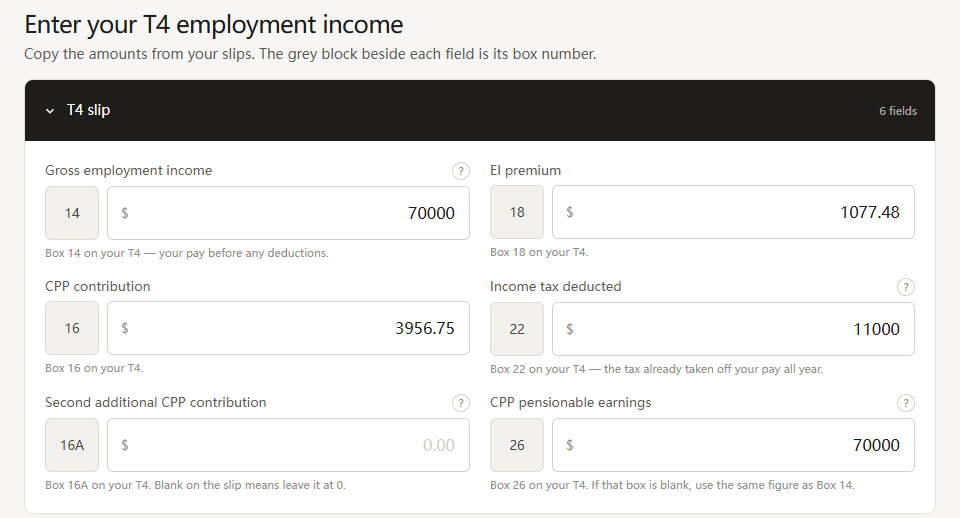
The flow begins with tax year, province, age, and first-time home-buyer eligibility. These answers determine which tax tables, pension rules, and FHSA options apply, so the product does not ask everyone the same questions.
Mirror the documents users already have
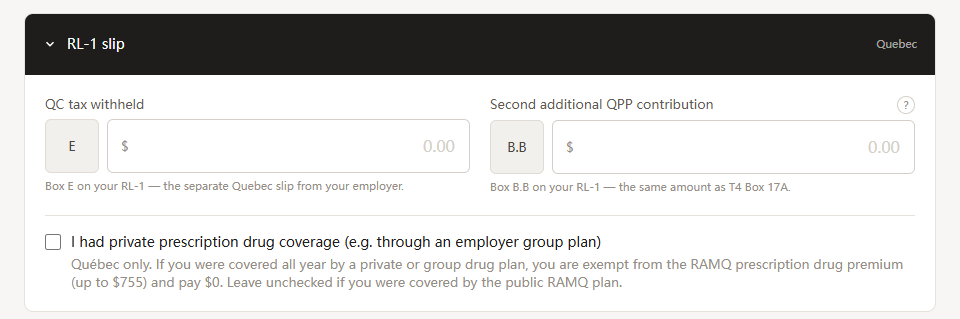
Employment income follows the structure of the T4, including box numbers, so values can be copied directly. Quebec users see the relevant RL-1 fields. This keeps the common employment path short without pretending every tax situation is the same.
Treat contribution room as a constraint
Users enter the RRSP room from their CRA Notice of Assessment and, when relevant, their FHSA room; those figures differ for everyone and cannot be inferred from income. The model treats them as hard ceilings. The purpose is not to push people toward the maximum — it is to keep the recommendation valid for their situation.
Lead with the answer, then support exploration
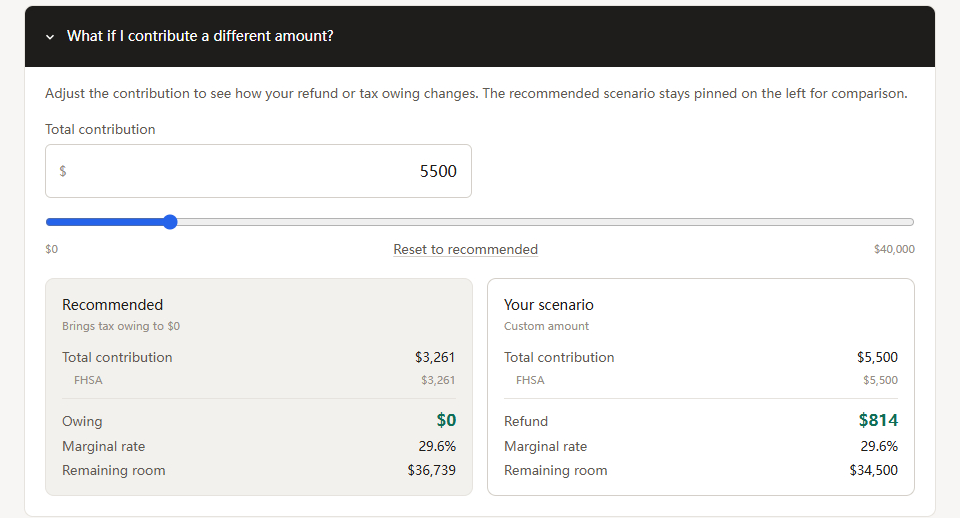
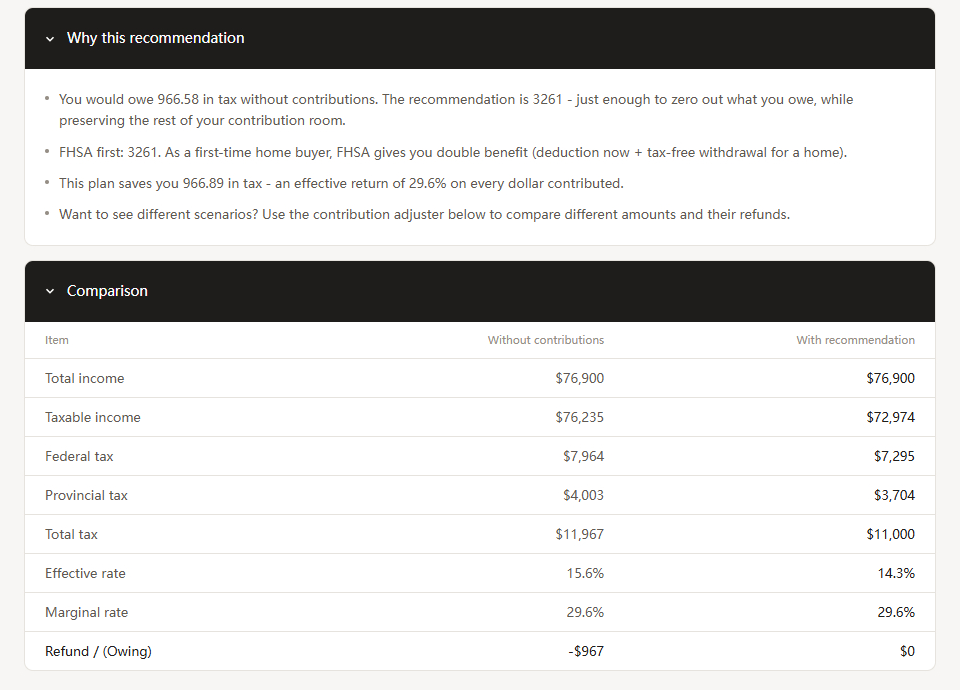
The results page opens with the strategy, estimated tax outcome, and suggested FHSA/RRSP split. Users can switch strategies or enter a custom amount, with the recommended plan kept beside the alternative so differences in refund, cash committed, marginal rate, and remaining room are visible at once. Explanations sit behind expandable sections — the recommendation is never a number the user simply has to accept.
From a personal question to a deployed MVP
I owned the product strategy, information architecture, UX/UI, interaction detail, and test design, managed through a structured backlog of 35 core tickets. AI helped me implement faster, but I set the scope, wrote the logic requirements, and decided how the product would be validated.
Most of the difficulty sat below the interface. Progressive federal and provincial rates, tax already withheld, several income types, CPP/QPP differences, deductions, and contribution limits all had to resolve into a single recommendation. The first MVP covers Ontario, British Columbia, and Quebec for the 2024 and 2025 tax years — roughly 75% of Canada's population. Quebec was the useful design test: RL-1 and QPP add province-specific complexity that should not spill into every user's flow.
Language: English and Chinese today, French before launch
The interface ships in English and Chinese. Chinese is my first language and I was this product's first user — the tax bill it started from was my own. Adding Chinese was not a market decision; it followed from the same reason the product exists at all.
Localization turned out to be constrained by the paper. Whichever language the interface is in, the user is copying values off a slip printed in English or French, so a field label has to stay recognisable against the physical document. Translated copy sits around the official term rather than replacing it.
French is next, and it is scheduled rather than aspirational. Quebec is already in the tax engine — RL-1 and QPP are handled — so the province is served by the calculation ahead of the interface. Building in two languages already put the localization structure in place, which makes French mostly terminology rather than plumbing: roughly six to eight working days, well before the public launch.
What the first version delivers
The working bilingual MVP accepts information from tax documents, applies year- and province-specific rules, recommends a contribution strategy, and supports what-if comparisons. It is deployed and usable today at roomtosave.pages.dev.
I validated 37 named scenarios, reconciling every result against both TurboTax and Wealthsimple to the cent — across income, withholding, provinces, contribution room, optional income, and target outcomes. Testing uncovered about 17 calculation bugs; affected scenarios were rerun after each fix.
That work proves the model, not the experience. No one outside the project has used it yet and it has not had a professional accounting review, which is why the next round of validation is about comprehension and trust rather than arithmetic: can people complete the flow using their real tax slips without help, and do they understand why an amount was recommended?
The interface says plainly that results are estimates and that final amounts depend on CRA assessment. For a financial tool, being clear about that limit is part of earning trust.
From working MVP to public launch
Room to Save is a working product today, but it was built for one filing season and released to no one. The plan between now and early 2027 closes the gap between those two states.
- 01 French interface — the next one to two monthsMostly terminology rather than plumbing: matching every field to the official French wording on the T4, RL-1, T4E, and Avis de cotisation, then re-checking layout and fr-CA number formatting.
- 02 The 2026 tax year — by the end of 2026Rates, bracket thresholds, and contribution limits change annually, so the update has to land before people start planning. Doing it once establishes the annual update process the product will need every year after that.
- 03 Usability testing with first-time users — before launchWatching where the input flow stalls, and whether the results page reads as a recommendation or as a wall of numbers.
- 04 A free public launch — early 2027, ahead of filing seasonThe timing is the point. RRSP contributions have a deadline that falls before most people file, so a tool that tells you the amount while you are already filing has arrived too late to act on. Launching before the season gives users time to work out the number, decide on it, and actually make the contribution.
- 05 More provinces — after the model is provenThe tax engine is structured to take additional provincial tables, but accuracy has to hold first.
A simple product can still solve a meaningful problem
A focused tool can still be a real product. I took one specific problem, defined the boundary myself, and carried it from an early idea to a deployed release.
Accurate information can still leave people uncertain — CRA pages and calculators explain the rules correctly without helping anyone decide what to do next. Trust came from making the answer inspectable: document-based inputs, visible limits, side-by-side comparisons, and honest caveats mattered as much as the formula. Saying no to features made the product stronger. AI made development faster without owning any of the decisions.
It is a small product, but it captures the way I like to work: find a concrete problem, make the important decisions visible, and ship something people can actually use.
Room to Save is an informational planning tool, not a substitute for professional tax advice. The figures in this case study describe build and verification work — scenarios tested, results reconciled, bugs found. They are not user outcomes.